Reset the root password on Rocky Linux 9
Use this procedure to reset the root password on a Rocky Linux 9 system.
- Start the machine. When the bootloader screen appears, press the Up Arrow or Down Arrow key to stop the boot countdown.
- Select the most recent kernel and press e to edit the boot parameters.
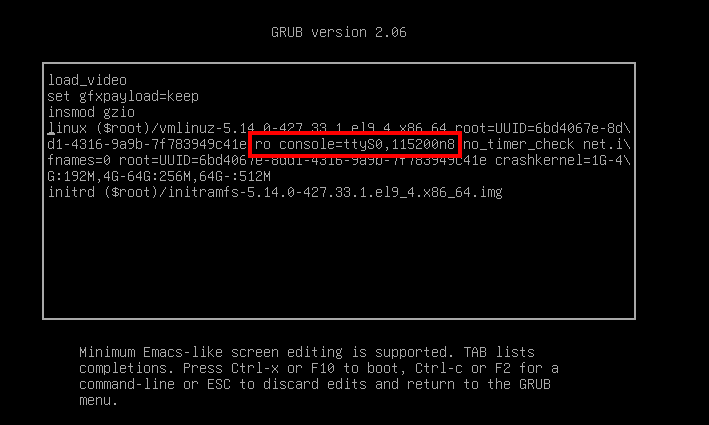
- Find the line that starts with
linux, then modify it as follows:- remove the
consoledirective and its value, for exampleconsole=ttyS0,115200n8 - remove any other
console=...orvconsole=...attributes - replace
rowithrw - add
init=/bin/bash
- remove the
The modified linux line should look similar to this:
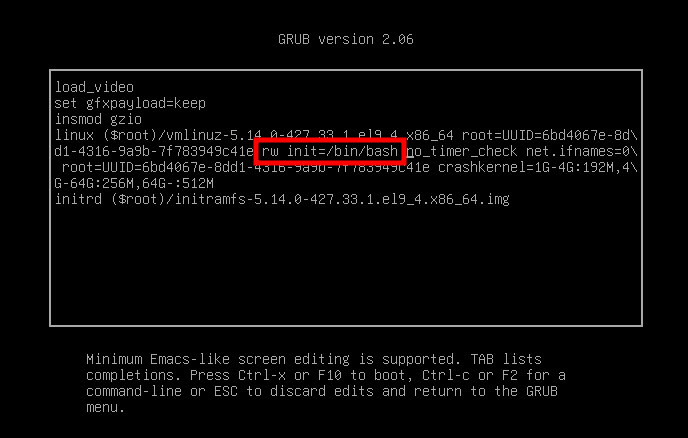
- Press Ctrl-x to boot the system with the modified parameters.
- Wait until the boot process finishes and the shell prompt appears.

- Change the
rootpassword:
passwd
- Force an SELinux relabel:
touch /.autorelabel
warning
Type the touch /.autorelabel command exactly as shown. If you make a mistake in the file
name or path, you must restart the whole procedure.
- Reboot the system:
/usr/sbin/reboot -f
The machine can reboot more than once. When the reboot sequence is complete, log in with the
new root password.